Over the weekend, as I was in the organizing mode (specifically, organizing better my genealogy files), I ran across this article on Evernote's blog. It had some great ideas for using the Evernote app to capture and organize genealogy information, but it also gave me an idea:
I could use Evernote as an electronic timeline and capture device for a life story project! Many writers use Evernote to write novels, so why couldn't I use it to write a memoir?
I've been jotting story ideas on a paper timeline for a long time, which is great. The only problem is that it's not entirely portable. So if I get an idea for a story while I'm at the grocery store, I have to wait until I get home to write it on my timeline, and I might forget by then. But if I have my phone with me, voila! I can pop it in my Evernote app to remember later.
If you are not familiar with Evernote, let me introduce you! It's an electronic note-taking app that works on any platform or device. I have been using Evernote for a few years now to keep track of everything from my client research to church assignments to "must read" book lists. It's highly functional and easy to use. And did I mention it's free? (They do offer a paid premium version, but I haven't had to upgrade to it yet.) Best of all, it instantly populates to all my devices. I can put a note in my phone now and call it up later on my computer or iPad, or vice-versa.
I can also capture web searches or internet sites, articles, etc. and save them to Evernote using their "web clipper."
If you are already familiar with the popular Evernote app, here's how I set up a life timeline for myself:

A simple life timeline using Evernote folders.
This was really very simple and took me just a couple of minutes. In my Evernote app, I created a new notebook stack called Alison's Life Stories. I added a few other notebooks to the stack, one for each division on my timeline: Infancy/early childhood, Grades 1-4, Grades 5-6, Junior High, etc.
In this instance, I opened up the "Grades 1-4" folder and clicked the "New note" button on the top menu. I typed just a few words to remind me about our dog Jimbo. Later, I can add more details about this incident, which I can use when I am ready to write the story.
I can continue to add as many new story ideas as I like to this "Grades 1-4" notebook. Here I've added a few more: memories about the house, a cross-country camping trip, etc.

Evernote's web clipper icon, resident in your browser bar.
I've also added a web page I found with some history about Iowa City, where we lived at the time. I captured this webpage into a note using Evernote's web clipper tool. (The tool is downloaded and added to your browser bar.) I just clicked on the little elephant head and I was given a choice of which notebook to add it to. See the example below:
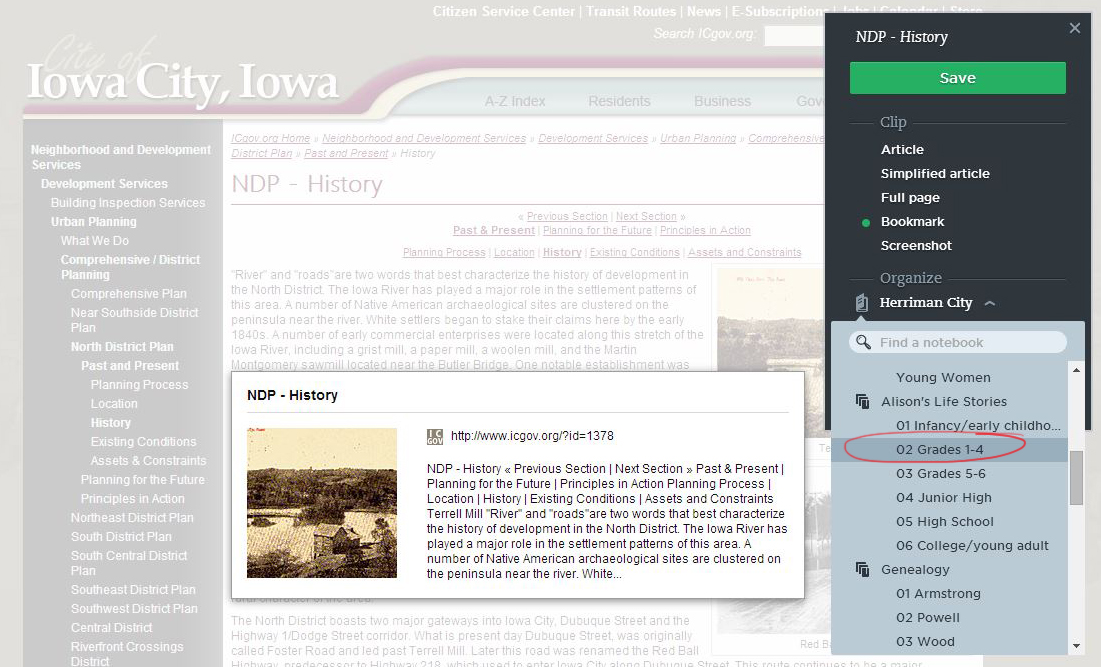
Upon clicking the Evernote web clipper tool, I am presented with a menu with my own notebooks. I can then choose which notebook I want to add it to.
I can also add tags to any of the notes in Evernote. A tag is a keyword that you can add to a note, so that a search on the tag term will bring up all notes, from any notebooks, that contain that tag.
Using a tag could be very helpful when I'm ready to decide which stories I actually want to write about, vs. other ideas that are interesting but not compelling enough for me to include in this project. I created a tag called "Write about this!" When I'm ready to write my stories, I can search on the tag and it will bring up all the story ideas I've selected. Then I can just pick one at random, look over the details I've written in that note, and start writing!
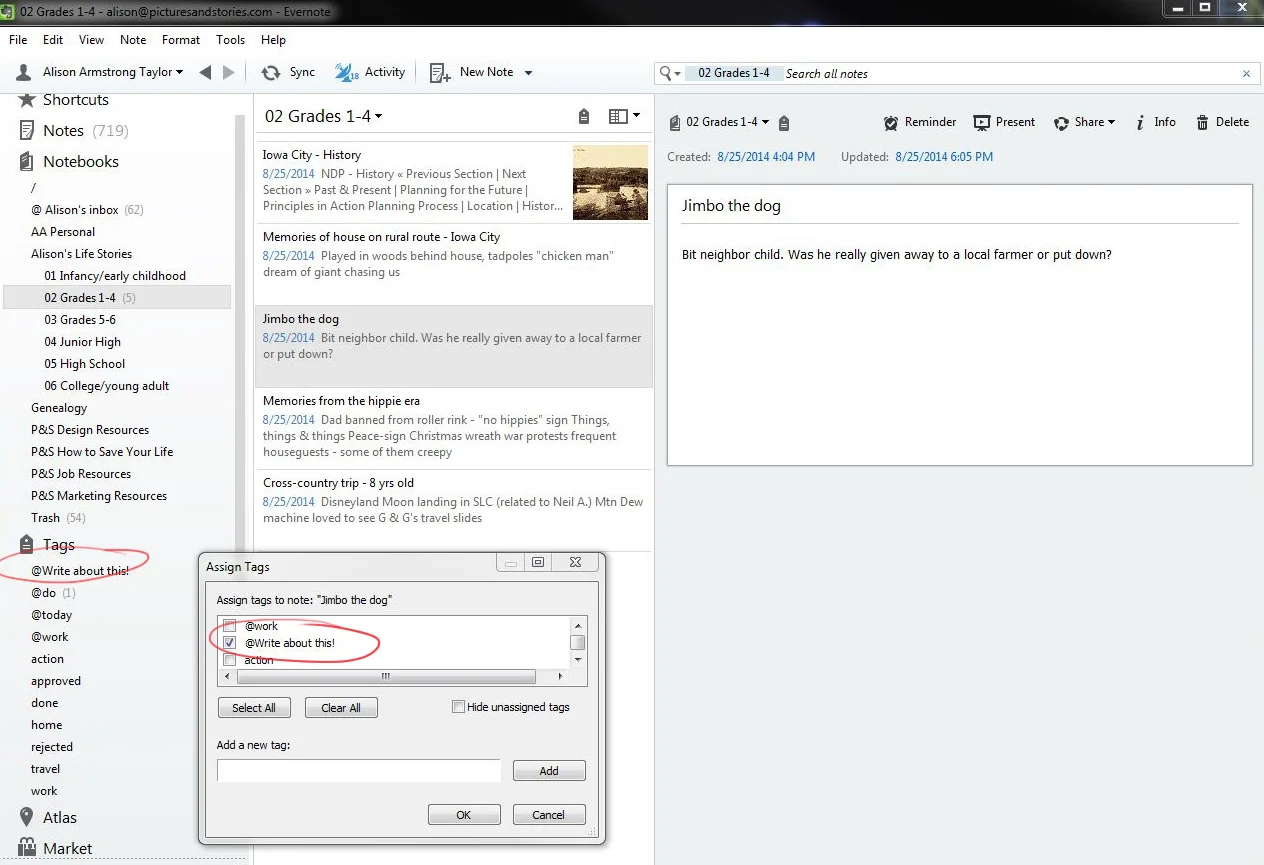
Here is the tag I created called "Write about this!" To add this tag to a note, I just right-click on the note and choose "assign tag." It will bring up my list of tags, and I check a box for each tag I want to add to that note or create a new tag.
As I explore this idea further, I will let you know how it's working for me and my story ideas. In the meantime, if you are already an Evernote user, and you are wanting to work on a life story project, this might be a great way to start!